How a Need-to-Sell Vertical Banner Template Simplifies Property Promotion Workflows
When you need to move a property quickly—whether for sale or rent—every visual touchpoint matters. A generic poster often gets lost in the noise. That’s where a purpose-built Need to Sell Vertical Banner template changes the equation. It’s not just a decorative standee; it’s a structured communication tool that combines listing information, branding, and a clear visual process in one tall, attention-grabbing format. For real estate agents, property managers, and independent home sellers, having an editable rollup banner template shortens the path from “house on the market” to “open house ready.” This article explores how to integrate such a template into your existing marketing workflow, customize it effectively, and get the most out of its design assets without wasting time or sacrificing quality.
What the Template Includes and Why the Details Matter
Before diving into implementation, it helps to understand exactly what you’re downloading. The file set for a typical house rollup banner or standee banner template includes multiple formats: Ai, EPS, JPG, and SVG. These aren’t just convenience items—each serves a distinct role in a professional workflow. The Ai and EPS files are fully vector, which means shapes, text, and icons remain crisp at any size. The JPG gives you a flat, high-resolution preview for quick sharing, while SVG support opens the door for web use or further editing in other vector-compatible platforms.
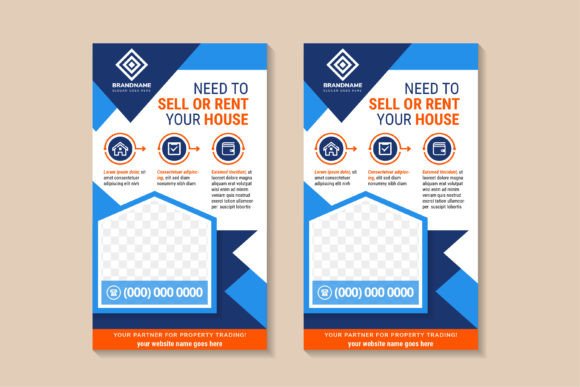
The design itself is built around an infographic process layout. That means there’s a sequence of steps or selling points—often with icons and example descriptions—that guide a viewer through the property’s key benefits. Blue and orange geometric elements frame the content, creating a contemporary, corporate feel without being cold. A dedicated space for a photo sits prominently, allowing you to feature the house or a key interior shot. All text, shapes, and even the color palette are editable, so you’re not locked into a single look. The files come in 300dpi resolution, so whether you print a 33-inch wide standee or a smaller rack card derived from the same design, the output stays sharp.
Fitting a Ready-Made Vertical Banner Into a Fast-Paced Marketing Cycle
In a typical property listing workflow, graphic design often becomes a bottleneck. Hiring a designer to build a rollup banner from scratch can take days, especially if revisions are needed. A professionally structured vertical banner template fits into your process as a plug-and-play asset. You open the editable file, swap in the property photo, update the descriptive text and price, and adjust contact information. Because the infographic elements are already laid out with sample content, you don’t have to think about visual hierarchy from scratch—just replace the placeholder with your own real data.
This asset is useful before, during, and after an open house or property showing event. Before the event, you can finalize the banner in under an hour and send the print-ready PDF to a local printer or an online service. During the event, the standee banner sits at the entrance or in a high-traffic area, silently working as a 24/7 information hub. After the event, that same design can be repurposed—extracted elements can become a Facebook cover image, a homepage header, or part of an email brochure. The consistency of keeping the same infographic process design across mediums reinforces your message and builds recognition.
Customization Strategies That Protect Your Brand and Save Effort
The real power of an editable template lies in how you tailor it. First, swap the hero photo. Make sure the image you use is at least 300dpi at the printed size; the template’s placeholder might be a lower-res example, but your replacement must match the intended output quality. Next, address the text. The original template likely contains sample headlines like “Sell or Rent Your House” and descriptive bullet points with icons. This is where you add your unique selling points: square footage, number of bedrooms, proximity to schools, recent renovations. Keep the language concise—a vertical banner is read from a distance, often while someone is standing or walking by.
Color editing is straightforward if you want to shift from the default blue and orange palette to brand-specific hues. In the Ai or EPS file, use the recolor artwork feature to replace the orange accents with your agency’s color, or tone down the blue if it clashes with your existing signage. But even without color changes, the blue and orange combination is high-contrast and proven to attract attention in event environments. The geometric triangles and abstract background elements add movement without distracting from the text. If you don’t have access to Adobe Illustrator, the SVG file can be edited in free tools like Inkscape, and a high-quality JPG can be annotated or combined with other graphics in Canva or PowerPoint for less complex changes—though vector editing is recommended for crisp output.
Using the Infographic Process Design to Educate and Persuade
One standout feature of this vertical banner template is the inclusion of a process-based infographic. Instead of a static list of rooms or features, the layout guides the eye through a sequence: perhaps “Schedule a Viewing” → “Explore the Neighborhood” → “Secure Financing” → “Move In.” Or for a seller, it could illustrate the sales journey the agent provides. These icons and short example descriptions are not just decorative; they reduce the mental effort a potential buyer or renter needs to understand what to do next. This is especially valuable in open houses where you cannot personally walk every visitor through the steps.
When editing the process section, keep the sequence logical and limited to 3–5 clear stages. Overloading the banner with a 10-step process makes it unreadable at banner scale. Use the existing icons as launch points—if the template shows a key icon for “price,” a home icon for “inspection,” or a handshake for “closing,” you can replace or keep them as appropriate. The example descriptions are written in generic English; overwrite them with your local market terminology. This small editing step transforms the banner from a generic template into an agent-specific tool that sounds like you, not a stock resource.
Managing Print Production and File Compatibility
The difference between a fuzzy standee and a sharp, professional-looking display often comes down to how you handle the print file. With the Ai and EPS versions, you can set the document up to the exact final dimensions your printer requires, add bleed if needed, and convert text to outlines for perfect reproduction. Since the design is 100% vector and 300dpi, you don’t need to worry about pixelation. If your print vendor accepts EPS files, send that. If they prefer PDF, generate one from the Ai source. The JPG file is useful for a quick online proof or for sharing with the event coordinator so they can plan the physical placement.
For remote team collaboration, keep the editable source files in a shared folder with clear naming conventions: “Property_123_Main_Standee_v2.ai” makes it obvious. Avoid the mistake of flattening too early; always keep a layered master version so that future adjustments (like changing the price or adding a “Sold” sticker overlay) can happen without a full redesign. The SVG format can also be placed directly into web pages, which means you can embed the banner graphic on a property listing site at a small size, and it will remain legible because it’s vector.
How Multiple Professionals Can Integrate This Banner Template
Real estate agents aren’t the only ones who benefit. A property management company needing to advertise apartment rentals can use the same layout, replacing “Sell” with “Lease” and adjusting the infographic to highlight amenities and application steps. Home staging professionals could create a standee that shows before-and-after transformations, using the photo space for a stunning interior shot and the process section for the staging timeline. A homeowners’ association selling or renting community spaces could adapt the template for their own events, changing colors to match community branding. Even small businesses that operate in real estate-adjacent services—moving companies, inspection services—might find the “sell or rent your house” structure adaptable, as the general layout of image, infographic, and contact block works for many service promotions.
The editable nature of the text and shapes means the template can cross over into non-real-estate uses with minimal friction. The blue and orange geometric style is abstract enough to serve as a corporate event banner or a service menu display. If you remove the house-specific icons and rework the process steps, you have a clean vertical infographic banner for any industry. This reusability makes the single template asset work harder across multiple projects, which aligns well with small business owners and freelancers who need to maximize every resource purchase.
Long-Term Organization and Brand Consistency
Once you’ve edited and saved a few versions for different properties, you start building a library of banner variations. Over time, this library becomes a visual asset bank. Because the template is well-organized—with clearly named layers for background, photo, text, and icons—returning to it months later is simple. You’ll quickly locate the editable headline area and swap in new information without hunting through grouped objects. This consistency in file structure reduces frustration and encourages reuse.
For agencies, maintaining brand consistency across many listings is a constant challenge. Using the same vertical banner template core for all properties means every agent’s display carries the same geometric framing and layout logic. Only the property-specific details change. Clients and prospects start associating that visual style with your company’s reliable, process-driven approach. That subtle branding advantage can influence decision-making when sellers choose an agent who seems well-prepared with cohesive marketing materials.
Common Implementation Pitfalls and How to Avoid Them
Even with a high-quality template, results can suffer from a few oversights. The most frequent is using a low-resolution photo in the dedicated image space. Always check the effective PPI at the print dimensions. Another issue is overcrowding the banner. The template is designed with breathing room; resist the urge to add extra bullet points or shrink the font to cram in more information. A vertical banner works best when the main message is readable from 10 feet away, and supporting text from 5 feet. Test your customization by printing a scaled-down version on a letter-size sheet—if you can’t comfortably read it at arm’s length, increase font sizes or cut text.
Color mismatches can also occur if your printer uses a different color profile than what you see on screen. When possible, request a hard proof, especially if you’ve changed the blue and orange elements to custom brand colors. The vector nature of the template minimizes these issues, but CMYK conversion from an RGB-based screen preview may alter brightness slightly. A quick pre-flight check in Illustrator can catch these before production. Finally, remember to update the JPG preview file if you’re sharing the design with a client for approval—nothing confuses a seller more than seeing the old sample property photo alongside your new listing info.
Expanding the Banner’s Reach Across Digital Platforms
While the primary use case is a physical rollup or standee banner, the same design can live digitally. Take the completed banner graphic and crop it into a Facebook event cover for the open house. Extract the infographic section alone and use it in an Instagram carousel to educate followers about the buying process. The background geometric elements can be isolated and used as subtle pattern overlays in email newsletters. Because you have both EPS/SVG and JPEG formats, you can scale down without losing the visual coherence that ties your digital presence back to the physical banner viewers saw at the property.
This cross-platform application is where the 100% vector promise pays off. You’re not stuck re-creating graphics in different programs; you just export the banner sections at the exact pixel dimensions needed for each channel. The high resolution means that even a tightly cropped portion of the infographic will look clean on a smartphone screen. If you’re active on property listing websites that support HTML descriptions, you can use the SVG version of the process diagram inline, creating a richer, more engaging listing detail page.
Integrating a Need to Sell Vertical Banner into your marketing process isn’t about flashy design tricks—it’s about operational efficiency and clear communication. When the template gives you editable text, a photo placeholder, and a thoughtful infographic layout right out of the box, you spend less time arranging elements and more time connecting with potential buyers or tenants. Whether you’re preparing for a single open house or managing dozens of property showings, having a reliable, high-resolution vector banner backbone lets you maintain quality, speed up production, and keep visual messaging consistent. And because the files are well-organized and widely compatible, you can hand them off to printers, collaborators, or your future self without friction.