Advanced Material Vertical Flyer – Polygonal Template for Modern Brands
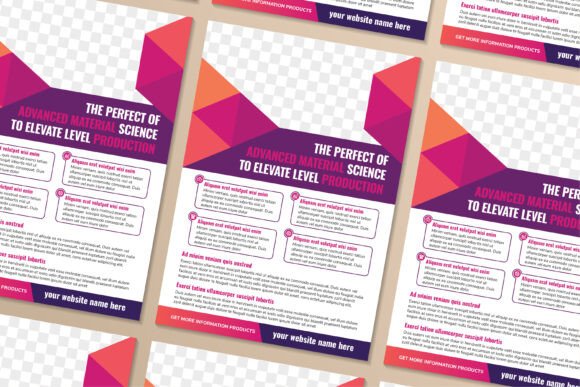
You know that moment when a cover design just clicks—it feels simultaneously futuristic, professional, and impossible to ignore? That’s the energy packed into the Advanced Material Vertical Flyer. It’s more than a blank canvas; it’s a pre-built layout constructed from intersecting triangles, arrows, floating polygons, dotted grids, and clean connecting lines, all drenched in a gradient that moves from deep purple through vibrant pink to warm orange. This isn’t a passive backdrop. The geometric interplay gives the whole piece a sense of motion and precision, like a data visualization meeting a high-end product brochure.
Whether you’re creating an annual report, a tech magazine cover, a product flyer, or a leave-behind brochure, the template delivers a consistent visual language that says forward-thinking and structured. It’s fully editable right down to the smallest shape, and because everything is built as 100% vector graphics at 300dpi, you can scale it for a business card or a billboard without losing a pixel of clarity.
The Visual DNA of the Advanced Material Vertical Flyer
At first glance, the composition feels architectural. Polygons and triangles overlap and intersect, creating a layered, three-dimensional illusion that guides the eye naturally from the title area down to supporting text blocks. Arrows subtly reinforce directional flow—you can use them to point toward a call to action, a key statistic, or even to thread multiple pages together in a longer document. Tiny dots and fine lines mimic digital circuit traces or stellar constellations, which makes the design equally at home in a science presentation, a tech startup pitch deck, or a futuristic brand identity.
The color palette is one of the template’s strongest assets. Purple anchors a sense of creativity and wisdom, pink injects energy and modernity, while orange brings in warmth, innovation, and urgency. Together they avoid the cold, sterile feel of many “tech” templates. The gradients are pre-built but completely tweakable. You can dial up the purple for a more corporate tone, or let the pink dominate for a bolder, youth-oriented brand. The shapes are well-organized in clearly labeled layers, so you won’t waste time hunting for a single arrow hidden inside a group.
Where This Template Excels in Real-World Projects
The Advanced Material Vertical Flyer template works best when your message needs to feel polished, technological, or idea-driven. Here’s where it shines most:
- Annual Reports and Corporate Profiles – Turn dry financial data into a dynamic visual story. The polygonal background can frame charts, graphs, and mission statements, making stakeholders actually want to flip through the pages.
- Tech and Science Magazines – Whether you’re doing a cover feature on AI or a 4-page spread about sustainable engineering, the abstract geometry sets the stage without distracting from photography or body text.
- Product Flyers and Launch Brochures – For software products, hardware gadgets, or industrial components, the arrow and line motifs suggest precision and speed. Swap the placeholder text for your USPs, and you’ve got a sales tool that looks custom-designed.
- Research Posters and Academic Presentations – When you need to share complex data with an interdisciplinary audience, the clean vector style keeps things professional and accessible, while the editable shapes let you highlight key findings.
- Social Media Brand Kits – Export a single page as a JPG or SVG for an Instagram announcement, then adapt the same design into a vertical story format. The consistent style across platforms builds instant recognition.
One of my clients, a biotech startup, used this template for their investor pitch booklet. They recolored the purple to their brand navy blue and left the pink and orange as accent shades. The result looked like a bespoke design package that cost thousands, but they executed it in a single afternoon.
Shaping Brand Perception with Abstract Geometry
Abstract geometric layouts do something interesting to the human eye: they signal order, innovation, and control. When a potential client or customer sees this Advanced Material Vertical Flyer cover, they don’t consciously count the triangles, but they do pick up on the underlying consistency. That subconscious reaction translates into trust. If your brand deals with complex solutions—be it cloud computing, industrial automation, or consulting services—the polygonal style visually reinforces that you can handle complexity elegantly.
The direction of the arrows matters, too. By default, many arrows sweep upward or to the right, which naturally implies growth and progression. You can flip them, rotate them, or replace them with your own icons if you need to emphasize a different narrative. The dotted lines add a “connect-the-dots” feel, perfect for storytelling about data integration, network building, or step-by-step processes. Because all these elements are editable, the template never forces a narrative you don’t want. It just gives you the visual grammar to tell yours more clearly.
For a marketing team, this consistency across a flyer, a brochure, and a digital PDF builds a coherent brand identity. People start to associate those interlocking shapes and that particular shade of gradient with your voice. That’s the kind of visual equity that turns a simple template into a long-term asset.
Customizing the Template for Your Unique Voice
The magic of a well-organized vector file is that nothing is ever truly “locked.” In the Advanced Material Vertical Flyer, text placeholders are just that—placeholders. You can replace them with your own headlines, body copy, and taglines in English or any other language. The fonts originally used are common system fonts, but you’re free to drop in your own licensed typefaces to match your brand guidelines. I recommend pairing a clean geometric sans-serif for headlines with a readable serif for longer descriptions, or going full modernist with an elegant lightweight sans family all the way through.
Colors shift with a few clicks. If the purple-pink-orange gradient isn’t your vibe, you can recolor entire groups of shapes at once. Want a monochromatic blue theme? Select all the purple objects and change the fill to navy. The pink becomes aqua, the orange becomes gold. Suddenly the same layout feels completely different—cooler, more corporate, or even more playful. The vector structure means there’s no degradation, no jagged edges, no muddy blending.
Typography and Layout Adaptations
When you drop in your brand typefaces, pay attention to the natural reading flow the template establishes. The title sits in the upper left or center, often framed by triangles, while secondary information drifts toward the right or bottom. This isn’t accidental. It mirrors the way many Western audiences scan a page. If you’re localizing for a right-to-left language, mirror the layout horizontally in your design software. The editable shapes make that transformation painless.
For publications that need multiple pages, like an annual report, you can extend the visual theme by duplicating the background layer set and adding new text boxes. The polygonal elements work as page headers, section dividers, or even subtle watermarks when you reduce their opacity. I’ve used a similar approach to create a 16-page catalog where each product category got its own color variation of the same geometric base. The result was cohesive, modern, and surprisingly affordable to produce.
Choosing the Right Format and Licensing for Your Project
The download package includes AI (Adobe Illustrator), EPS, JPG, and SVG files. That variety covers almost any use case. The AI and EPS files are where you’ll do the heavy editing—swap text, change colors, move shapes around, and prepare for high-resolution print. SVG is a web-friendly vector format that you can drop directly into a website or presentation software like PowerPoint or Keynote without losing quality. The JPG gives you a quick preview or a ready-to-use image for social media, but I’d recommend sticking to vectors for any client-facing work.
Because the template is delivered at 300dpi in A4 size (210 × 297 mm), it’s ready for commercial offset printing, digital printing, or even large-format output. All graphics are 100% vector, so you can scale up to A3 or tabloid without pixelation. The license typically covers use in end products for yourself or a client, meaning you can design a flyer, hand it over, and let them print it. Just check the specific license terms if you plan to resell the template on its own—most shops allow personal and commercial design projects but not direct redistribution of the editable source files.
Practical Design Observations from a Pro
After years of working with templates like this, I’ve picked up a few habits that save time and keep the final piece from feeling like a cookie-cutter job. First, don’t be afraid to delete elements. The template has a rich visual language, but sometimes less is more. If a section feels too busy, remove a few dotted rings or a cluster of polygons. The remaining shapes will still carry the style. Second, layer your own photography carefully. The template’s abstract nature pairs beautifully with crisp product shots or portraits, but make sure your images have a slight color grade that echoes the palette. A cool blue cast on a photo might clash with warm pink arrows; a quick hue adjustment fixes that.
Third, test readability early. Place your real text in the layout and zoom out. Can you still read the headlines at 25% view? If not, consider adding a subtle semi-transparent shape behind the text area, or bumping the font weight up a notch. The template’s dynamic design includes plenty of empty space for text overlays, but it’s always wise to double-check.
Finally, think beyond a single page. The Advanced Material Vertical Flyer works as a standalone piece, but it also shines as part of a system. Use the same background elements on the cover of a whitepaper, the header of an email newsletter, and the intro slide of a webinar. That kind of visual repetition builds a brand identity that feels deliberate, polished, and effortlessly high-end. And since all the graphics are vector, you can remix them endlessly without ever needing to re-license the assets.
If you’ve ever struggled to make a business proposal or a research poster look as innovative as the ideas inside it, this template removes that friction. It’s not just about looking good—it’s about communicating that your work belongs in the future. The editable shapes, the high-resolution files, and the thoughtful geometric flow all come together to give you a head start on a design that would otherwise take hours to construct from scratch.